


brightwheel: Childcare App
4.73.82K Reviews
App Specs
- Version
- Varies with Device
- Updated On
- License
- Free
- Downloads
- 1,000,000+
- Developer
- brightwheel
- Categories
- Education
- Platform
- Android
Screenshots
 Analysis by AppCompare
When a childcare setting has to keep families informed while staff supervise a busy room, small administrative tasks can pile up quickly. I see brightwheel: Childcare App as an attempt to bring those routines—attendance, family updates, billing, and learning records—into one shared workflow. It is an education app from brightwheel, and its appeal depends less on any single tool than on whether a center and its families are willing to use the same system consistently.
What the free price does—and does not—tell you
The app is free to download, which makes it straightforward for a parent or educator to try the mobile experience without paying for the download itself. That is useful when you are deciding whether its day-to-day layout feels comfortable. I would not treat “free” as proof that every service connected to a childcare program has no cost: tuition and any arrangements made by a center are separate matters, so families should check those details directly with their provider.
That distinction matters most around billing. The app can support payment tasks, but using it does not make childcare itself free, nor does the download alone tell a family what payment methods or charges their center uses. I would ask the administrator how billing is set up before relying on the app as the place to settle an account. For a staff member evaluating the tool, the useful question is whether it replaces enough existing paperwork and communication to justify adopting another routine—not simply whether the app has a download price.
Where the value comes from in an ordinary week
The clearest value is coordination. A check-in record can give staff and families a shared reference point, while daily reports give educators a place to pass along information about a child’s day. Learning and record-keeping tools can also keep observations closer to the classroom routine instead of scattered across paper notes. If a center already handles these jobs in several disconnected ways, bringing them together could reduce the number of places people need to check.
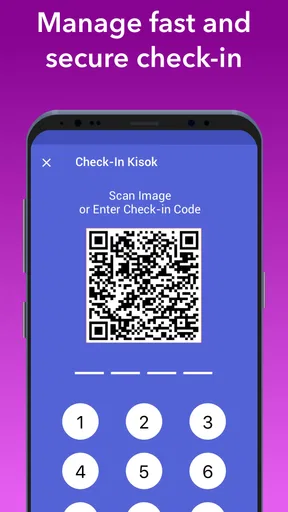
Consider a typical morning: a parent is hurrying to work, a teacher is greeting children, and the administrator needs attendance to be reliable. A digital sign-in can make the handoff easier to track than a sheet passed around the entrance. Later, a teacher can send a report so the parent has a clearer sense of the day without needing to catch a staff member at pickup. That is a practical benefit, but it works only when staff have enough time to enter information and families know where to look for it.
Trade-offs behind the all-in-one approach
Putting many tasks in one app can simplify a center’s routine, but it also means the app becomes part of the center’s operating habits. If some staff keep paper notes, some use the app, and families expect updates through a different channel, the extra system can add work rather than remove it. Before a program switches over, I would decide who records attendance, who sends family updates, and how staff will handle a busy moment when a child needs attention more than a phone or tablet does.
There is also a difference between having a tool and using it well. A daily report is only helpful when it contains timely, meaningful details; an empty or irregular update can leave families no better informed. Likewise, digital records are useful only if staff enter them consistently and the center has a clear process for correcting mistakes. Parents should not assume that an app notification replaces a direct conversation about an urgent concern, a change in routine, or a question that needs context.
Worth Reading Before You Choose

EA SPORTS FC Mobile 26 Is a Bigger Football Game, but It Takes Time

Flipboard Shows What News Apps Must Do Beyond the Feed

Switching to Android Auto Means Rethinking Your Driving Routine

Google Calendar Makes a Crowded Week Easier to Manage

Ludo King Makes the Most of the Minutes Between Plans

Baby Panda World Brings Quick Play to Modern Phones, but Its Game Library Feels Busy
Who is most likely to get value
I would look first at centers that want attendance, family communication, billing, and learning-related tasks to live in a coordinated digital workflow. Teachers may appreciate having routine records closer at hand, while administrators may value a more organized way to manage recurring communication and paperwork. Parents who want regular visibility into the school day may also find the app useful, especially when their childcare provider actively uses it rather than treating it as an optional extra.
It is a less obvious fit for a family whose provider does not use brightwheel, or for a small program that already has a simple process everyone follows reliably. In those cases, installing another app may not improve anything. It may also be a poor choice for someone who wants every childcare conversation to happen in person or who prefers not to manage routine updates through a phone. The decision should follow the center’s actual workflow, not the promise of an all-in-one label.
How it compares with familiar alternatives
The usual alternatives are a paper sign-in sheet, messages sent through separate channels, and records kept in individual documents or folders. Those methods can be perfectly workable for a small setting, and some educators may find paper faster when they are already supervising children. Their weakness is that information can become spread out: attendance lives in one place, family updates in another, and billing questions somewhere else.
brightwheel’s advantage is the possibility of connecting those routines in a single childcare-focused app. Its trade-off is that everyone involved needs to learn and maintain the shared process. A generic messaging app might be enough if a center only needs announcements, while a spreadsheet may suit a provider that mainly wants to track attendance. I would choose brightwheel when the combination of classroom records and family-facing tasks is genuinely useful, not just because more tools appear convenient.
For parents, a practical first step is to ask the center what it expects families to do in the app: check attendance, read reports, handle billing, or some combination. For teachers, I would test the workflow during a normal transition rather than judging it only while sitting quietly at a desk. Those small checks reveal whether the app fits the real rhythm of drop-off, classroom activity, and pickup.
brightwheel has an average rating of 4.7 from around 11,000 ratings, with roughly 3,700 written reviews and over 1 million installs. It is rated for Everyone, and the current version is 5.72.0, with Android 12 as the minimum operating system. It has been available since August 25, 2014. Those figures suggest it is an established option, but they cannot tell you whether a particular center uses it consistently or whether its routines suit your family.
Features That Stand Out
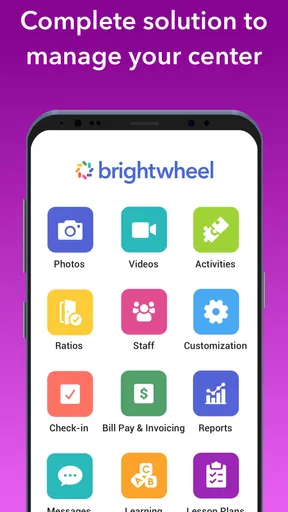
Right off the bat, brightwheel shines with its comprehensive feature list. It’s tailored to streamline daily operations in childcare facilities. From attendance tracking to parent communication, it’s like the Swiss Army knife of childcare apps.
Attendance and Check-Ins
One of the features I found incredibly useful is the digital check-in and check-out system. Say goodbye to paper sign-in sheets! Parents can check their kids in and out with a simple tap. Plus, it logs the exact time, making it super easy to track attendance accurately.
Daily Reports and Photos
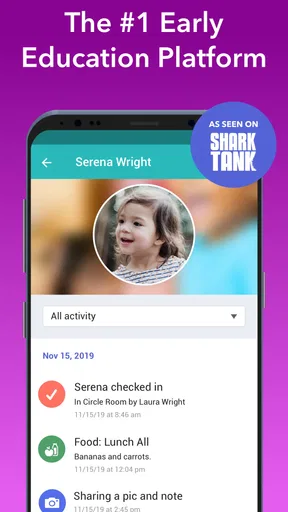
As a parent, receiving updates about your child’s day is priceless. With brightwheel, teachers can send daily reports and photos directly to parents. It’s like getting a sneak peek into your kid's world while you’re busy at work.
Lesson Planning and Record Keeping
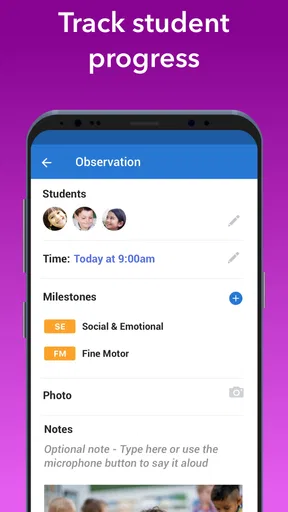
For teachers, the app offers lesson planning tools and a way to keep track of each child's progress. It’s all about making education a bit more organized and less of a hassle, which I’m sure many educators will appreciate.
Billing and Payments
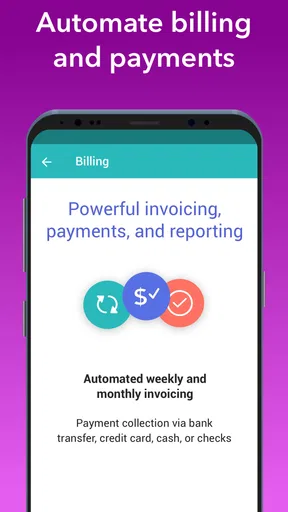
Handling payments can be a headache, but not with brightwheel. It integrates payment processing, so parents can pay tuition directly through the app. No more chasing down checks or cash—everything is streamlined and secure.
Why You’ll Love It
Now, let’s talk about user experience. The app is incredibly intuitive. Even if you’re not the most tech-savvy person, navigating through brightwheel is a breeze. The user interface is clean and simple, making it easy to find what you need without getting overwhelmed by too many options.
Parental Peace of Mind
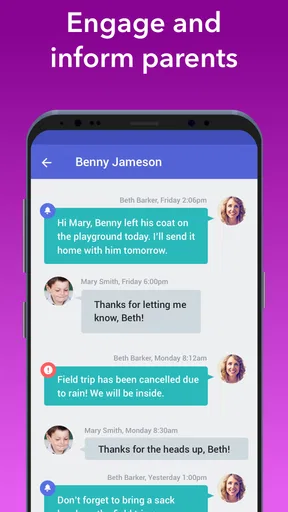
For parents, the app provides peace of mind. Knowing that you can receive real-time updates about your child’s day, track their attendance, and communicate directly with teachers is a game-changer. It really feels like you’re part of the classroom, even when you’re miles away.
Empowering Educators
Teachers and administrators will find this app incredibly empowering. It reduces the paperwork load and allows them to focus more on what truly matters—educating and caring for the little ones. Having everything digitized means less time spent on administrative tasks and more time for teaching.
brightwheel truly stands out in the world of childcare apps. It combines functionality with ease of use, making it a must-have for anyone involved in childcare. Whether you’re running a large daycare facility or a small family childcare home, this app has something to offer.
Wrapping It Up
In a nutshell, if you’re looking for an app that simplifies the chaos of managing a childcare center, brightwheel is your go-to. It’s packed with features that cater to every aspect of childcare management, from communication to billing and everything in between.
So, if you’re ready to embrace the digital age of childcare management, why not give brightwheel a try? It might just be the game-changer you’ve been searching for.
My bottom line on trying it
I would recommend starting with the part of the routine that causes the most friction. A parent might begin by checking whether attendance and daily updates are easy to find; a director might first map how billing and records fit into existing work. If those core tasks feel natural and the provider supports them, the free download makes trying the app a reasonable next step. If the center cannot commit to keeping its records current, a simpler method may serve families better.
My verdict is positive but conditional: brightwheel makes the most sense when the childcare provider adopts it as a shared system and gives staff and families a clear way to use it. It is not a substitute for attentive educators or direct conversations, and it will not automatically improve a disorganized process. But where attendance, updates, learning records, and billing are genuinely being coordinated, it can make the everyday exchange between home and childcare feel more orderly.
Pros
- Intuitive interface for easy navigation.
- Real-time updates for parents.
- Secure photo and video sharing.
- Streamlined billing and payments.
- Comprehensive activity tracking.
Cons
- Limited offline functionality.
- Subscription required for full features.
- Occasional sync delays.
- Learning curve for new users.
- Limited customization options.
FAQs for brightwheel: Childcare App
What is brightwheel and how does it benefit childcare providers?
Brightwheel is a comprehensive childcare management app designed to streamline administrative tasks for childcare providers. It offers features such as attendance tracking, daily activity logs, and parent communication tools. By using brightwheel, providers can improve efficiency, reduce paperwork, and enhance engagement with parents, allowing more focus on child development.
How can parents use brightwheel to stay connected with their child’s activities?
Parents can use brightwheel to receive real-time updates on their child’s activities, including photos, nap times, meals, and learning milestones. The app allows for seamless communication with caregivers, ensuring parents are informed and engaged in their child’s daily routine, thereby enhancing the parent-provider relationship.
Is brightwheel secure and how does it ensure data privacy?
Brightwheel prioritizes data security and privacy by implementing industry-standard encryption protocols. The app ensures that all personal and sensitive information is securely stored and accessible only to authorized users. Regular security audits and adherence to privacy regulations further bolster its commitment to user data protection.
What devices are compatible with brightwheel, and is it available on both Android and iOS?
Brightwheel is compatible with both Android and iOS devices, making it accessible to a wide range of users. The app can be downloaded from the Google Play Store and Apple App Store, allowing childcare providers and parents to easily access and utilize its features on smartphones and tablets.
Does brightwheel offer any customer support or training for new users?
Yes, brightwheel provides extensive customer support and training resources for new users. The app offers tutorials, webinars, and a detailed help center to guide users through its features. Additionally, their support team is available to assist with any questions or technical issues, ensuring a smooth onboarding process.


